Replace GPU PCI Riser Cards
Replace riser cards from both right and left trays.
- Replacement PCI riser cards:
- 101463801 – Right GPU tray (slots 1 and 4)
- 101464001 – Left GPU tray (slots 2 and 3)
- Tools: Adjustable torque driver (or Phillips screwdriver)
- Time: 30 minutes
- Server: Remove the server from the rack and place it on a stable ESD-safe work surface.
Remove Slot 2 Add-in Card
- If present, remove the slot 2 PCI add-in card.
- Disconnect the slot 2 PCI card and place it on an ESD-safe work surface.
Figure: Remove Slot 2 Add-in Card 
- Disconnect the slot 2 PCI card and place it on an ESD-safe work surface.
Remove Left GPU Sled
- Remove the left GPU sled from the server.
- Loosen 4 captive screws that secure the left GPU sled to the chassis.
Figure: Remove Left GPU IFBs 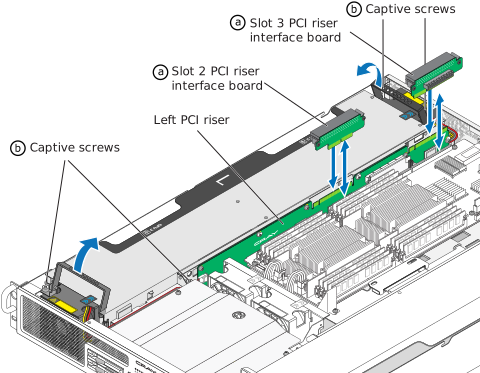
- Grasp each fan handle, and lift the GPU sled straight out of the chassis, unseating the power connector from the power backplane. Place the GPU sled on an ESD-safe work surface.
Figure: Lift Left GPU from Server 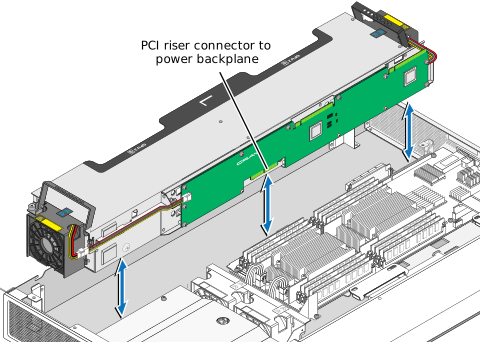
- Loosen 4 captive screws that secure the left GPU sled to the chassis.
Remove GPU Trays from Left Sled
- Remove all four GPU trays from the left GPU sled.
- Pull the handles to remove the GPU tray from the sled.
Figure: Remove Left GPU Trays 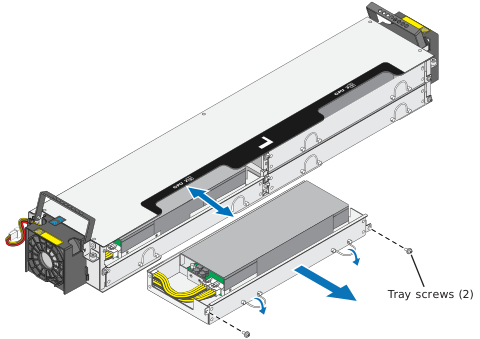 The GPU tray IFB includes a blind mate power connector that unseats from the PCI riser assembly when the GPU tray is removed.
- Pull the handles to remove the GPU tray from the sled.
Replace GPU PCI Riser Card
- Disconnect the fan connectors from the PCI card. One is on front of the PCI card and the other is on the backside, as shown below.
Figure: Replace Left GPU Riser Card 
Reinstall the Left GPU Sled
Replace Right GPU PCI Riser Card
Remove Right GPU Sled
- Disconnect the flex-foil cables (slots 1 and 4) from the GPU sled PCI riser assembly, as shown below.
Figure: Remove Right GPU Sled 
Remove GPU Trays from Right Sled
- Remove the four GPU trays from the sled.
Figure: Replace Right GPU Riser Card 
Replace Right GPU PCI Riser Card
Reinstall the Right GPU Sled
Final Steps