Network switches What are network switches?
Network switches are the networking hardwares that connect multiple devices within a network, ensuring efficient data transfer and managing network traffic. A network switch connects wired devices on a network by using packet switching to receive and intelligently forward data to the destination device. It is a crucial component in modern networking infrastructure. It serves as a central point to which all devices in a network can connect. Switches manage the flow of data across the network by receiving incoming data packets and determining the appropriate destination based on MAC addresses.
The choice of switch depends on various factors, including network size, required features, budget, and future growth considerations. Understanding these factors will help you select the right switch for your specific needs.
A network switch (often called an Ethernet switch) is essential networking hardware that provides wired connectivity to other networking equipment and devices using packet switching to receive and intelligently forward data to the destination device. Network switches transmit packets using their physical ports over fiber or copper twisted-pair cabling to connect access points, IoT devices, computers, and other network equipment.
Time to read: 10 minutes, 55 seconds | Published: October 16, 2025
Table of Contents
Why network switches?
Network switches provide wired network connectivity to devices and users. Modern networks require switches to provide connectivity throughout office spaces, buildings, and across facilities and campuses with support for the following:
- Traditional wired connectivity to high-performance engineering workstations, servers, wired printers, and network equipment.
- Wireless aggregation for access points where wireless is the primary connectivity method for users.
- Wired IoT connectivity for smart building devices including PoE lighting, signage, HVAC controls, surveillance cameras, and industrial IoT equipment.

How does a network switch work?
The way a network switch enables inter-device communication is that all connected systems, including the switch itself, follow a standard set of communications protocols. These standards are defined and maintained by international standards organizations, such as the Institute of Electrical and Electronics Engineers (IEEE) and the Internet Engineering Task Force (IETF).
There are three primary ways for devices to connect to a network: radio (such as Wi-Fi), electrical (such as RJ-45 Ethernet), and light-based optics. Each connection method uses a different means of physical network interconnection—RF spectrum, copper cabling, and fiber-optic cabling, respectively—over which IT devices communicate by sending each other a stream of 1s and 0s.
Network standards allow these streams of 1s and 0s to be interpreted into packets. Packets contain a header and a payload. Packet headers contain information such as the source and destination address of the devices that are participating in this communication. Payloads contain the data that the networked devices are actually attempting to exchange. Each device on a network has one or more addresses to which packets can be addressed.
Groups of packets exchanged by two or more addresses are called “data flows.” Data flows are roughly equivalent to individual conversations among networked devices. A switch reads the addresses from the packet headers and then forwards the packets toward their destination.
Switches maintain records, called lookup tables (LUTs). LUTs contain a list of which addresses can be reached using specific switch ports. Some switches, as well as all routers, can be configured with “routes.” Routes are a type of LUT that directs switches to send all packets with certain destinations to an intermediary switch or router. Using routes allows switches to send packets to devices when the switch doesn’t have address information.
A packet of data leaves the smartphone’s radio and is received by the AP. The AP reads the data packet and determines that it doesn’t know where the destination address in that packet header is located. The switch in the AP has been configured to send all packets with destination addresses it doesn’t know about to the Internet router, so it sends a copy of that data packet through its built-in switch towards the router.
From here, the data packet begins its journey across the Internet. From router to router, and across an unknown number of switches in between, that data packet will eventually arrive at a web server. The web server will respond in kind, sending data packets back along an Internet path toward the original source Internet router, AP-embedded switch, and eventually the smartphone.
This exchange of packets creates a data flow between the smartphone and the web server. Communication is possible because each one of dozens (if not hundreds) of different hardware devices and associated software between the source and destination adhere to standards that have been defined and maintained for decades.
For example, let’s consider how a smartphone might use a home Wi-Fi network to access a web page. The smartphone connects via Wi-Fi to an AP. The AP has a built-in RJ-45/Ethernet switch, which is connected to an Internet router.
What problems do network switches solve?
A network switch connects users, applications, and equipment across a network so that they can communicate with one another and share resources. The simplest network switches offer connectivity exclusively to devices on a single local-area network (LAN). More advanced switches can connect devices from multiple LANs and may even incorporate basic data security functions.
In the more advanced switches, functions beyond simple LAN interconnection are often a subset of those typically found in other network devices, such as routers and firewalls. Despite these switches’ advanced capabilities, they continue to be referred to as “switches,” because their primary purpose is to connect devices to one another as part of an IT network.
An important role of an advanced switch is the ability to create “virtual networks.” Virtual networks isolate groups of networked systems from one another based on configurations provided by network administrators. This capability allows large numbers of systems to be connected to a single physical network while securely segmenting certain systems from the rest. Virtual network types include virtual private networks (VPNs), virtual LANs (VLANs), and Ethernet VPN-virtual eXtensible LANs (EVPN-VXLANs), all of which are regularly used in midsized and large networks. EVPN-VXLAN is an increasingly common implementation of network segmentation in modern enterprise networks.
Network switches come in a wide variety of speeds, capabilities, and sizes. They can support anywhere from three devices to thousands of them. Multiple network switches can be connected together to support even more devices. The details of how these switches are connected is referred to as a “network topology.”
A modern “spine-leaf” topology using high-speed switches with high port density could easily connect tens of thousands of devices into a single physical network. In a spine-leaf data center network, leaf switches aggregate traffic from servers and connect directly to spine switches, which interconnect all leaf switches in a full-mesh topology. These large networks are typically segmented into numerous virtual networks using EVPN-VXLAN, with leaf switches providing access to (and routing for) different network segments.
This type of network is common in data centers shared by many customers (called “multitenant” data centers), as well as those used by governments and large enterprises.
Types of network switches
Below are the types of network switches:
- Access switches: Access switches sit at the edge of the network, often where most of the data originates. Their job is to connect users, wired client devices, and infrastructure equipment to the network. Some infrastructure equipment, like Wi-Fi access points, security cameras, and voice over IP phone systems, support Power over Ethernet (PoE) that simplifies deployment.
- Aggregation switches: Aggregation switches connect access switches together, aggregate outbound traffic, and distribute data across the network edge and to the network core. To effectively manage traffic volume, these switches often have multi-gigabit ports, redundancy features, and deeper Layer 3 routing capabilities.
- Stackable switches: Stackable switches allow multiple switches to be stacked together and function as a single unit. These network switches can also operate as a standalone device to function independently. Multiple stackable switches can be connected to build a “stack” that functions as a single switch with combined port capacity and increased reliability (minimal disruption).
- Chassis switches: Chassis switches (or also known as modular switches) allow for easy customization depending on the network needs, offering flexibility and scalability. These switches offer the ability to add or remove line cards (or modules) allowing network administrators to build a switch based on specific components like ports, power supplies and other functionalities.
- Core switches: Core switches sit at the heart of the network, typically connected to a router or gateway. They manage traffic coming to and from aggregation switches, the wide area network (WAN), and the internet. They typically offer High Availability (HA) capabilities to ensure continued network access.
- Data center switches: Data center switches are high-performance switches designed with HA and fault tolerance built in for mission-critical applications. They handle east-west and north-south traffic with top-of-rack and end-of-row features and deployment flexibility.
- Half-width switches: Half-width switches are a compact networking device taking up less physical space (half the space) compared to traditional full-width switches while offering the same functionality as full-width switches. Half-width options enable organizations to enhance their network capacity without the need for additional real estate, making it an ideal choice for environments with limited rack space and small offices.
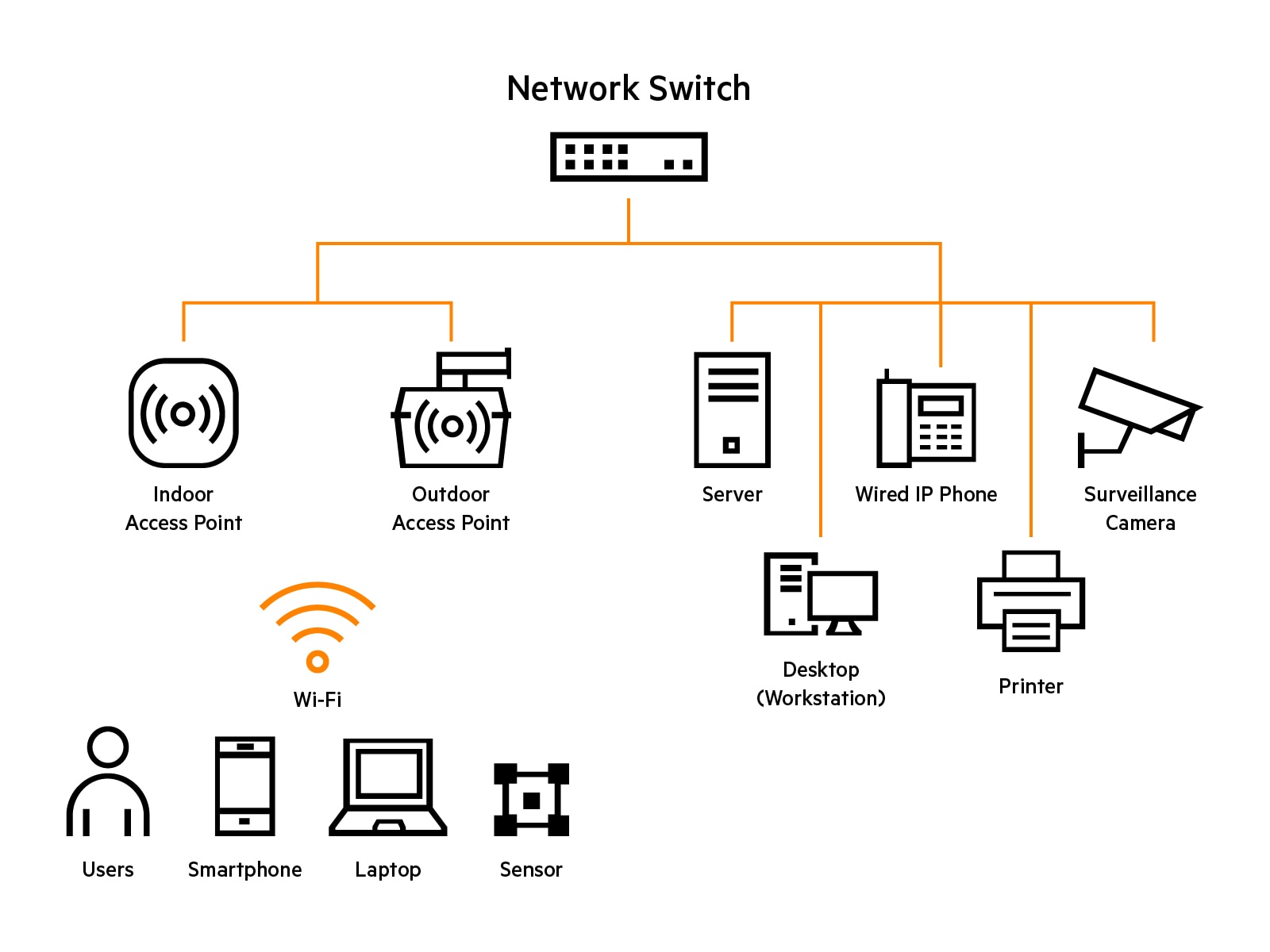
What a network switch connects
At the edge of the network, network switches provide connectivity for many devices including access points, workstations, and IoT devices.

Where is a network switch used?
HPE Aruba Networking's comprehensive CX switching portfolio includes solutions ideal for access, aggregation, core, and data center deployments. Features include high availability platforms with redundant management, fabric, power, fans, and high-density industry-standard high power 90W Class 8 and HPE Smart Rate multi-gigabit ports. The HPE Aruba Networking CX 10000 is a distributed services switch that provides 800G of distributed stateful firewall for east-west traffic, Zero Trust segmentation, and pervasive telemetry.
Where is a half-width switch used?
Half-width switches work best for environments with smaller footprint that demand space efficiency without sacrificing the performance. These compact high-density switches seamlessly fit into limited rack spaces, such as data centers, server rooms, making it ideal for small to medium-sized businesses, government and educational institutions, and retail scenarios.
Two half-width switches can be deployed side-by-side for redundant switching in a 1U footprint. This is ideal for space-constrained environments where you need to maximize rack space utilization while still having sufficient network ports. Half-width switches are an effective networking solution designed to optimize the network setup to save space while delivering high performance and essential network functionality, at an affordable price range in a compact form factor.
How do I choose a network switch vendor?
Your network switch vendor should:
- Demonstrate industry leadership as recognized by leading analysts such as Gartner, Forrester, and IDC.
- Offer a portfolio of intelligent, scalable, and high-performance switching solutions so you can create a network foundation ready for new technologies and future business needs.
- Help simplify operations by using automation to promote programmability, reduce manual tasks, and enjoy error-free configurations.
- Deliver real-time analytics and automation to speed troubleshooting and provide actionable recommendations for quick issue resolution.
- Support built-in security with unified policy enforcement globally across wired and wireless networks.
- Provide the flexibility to manage on-prem or in the cloud.
- Offer global support services to deliver desired SLA, attractive financial services, and as-a-service options.
How do network switches help address network requirements?
When evaluating solutions, first understand your network requirements and also consider that the best network switch may be part of a broader solution. For example, automation, embedded analytics, HA, and secure segmentation are designed into HPE Aruba Networking CX switches with HPE Aruba Networking Central delivering a unified, single view of the network that maximizes operational efficiency across enterprise networks.
Network requirements | How a network switch addresses it |
|---|---|
| Deployment: Know how and where the network switch will be deployed. | Switch features are based on specific requirements of data center, campus, branch offices, SMBs, and home office networks. Features are also based on access, aggregation, core, and spine and leaf switch requirements. |
| Form factor: Determine network size, density, and space constraints. | Fixed switches are 1U rack height with network ports built-in, typically support a maximum of 48 access ports, and may offer modular power supplies and fans. Modular chassis support hundreds of ports, allow network port customization with line cards, and often support redundant fabric, fans, and power supplies. |
| Performance: Determine network performance and user experience requirements with consideration for future network growth. | Switch port speeds of 1 Gigabit Ethernet (GbE), Multi-gigabit Ethernet (2.5 and 5 GbE), 10 GbE, 25 GbE, 40 GbE, 50 GbE, and 100 GbE connectivity are available. Non-blocking architectures help maximize switch throughput. |
| Availability: Determine business requirements for network uptime. | High availability can be delivered by both software and hardware with features like live upgrades that provide uninterrupted access during software updates, switch stacking, and redundant and hot-swappable power supplies, fans, and line cards. |
| Power over Ethernet (PoE): Calculate how many network devices such as access points require PoE power. | PoE technology allows PoE switches to use twisted-pair cable for both data and electrical power. PoE switches can support up to 15, 30, 60 and even 90 watts per port with total PoE limited by switch PoE power budget. |
| Segmentation: Plan segmentation strategy to keep traffic securely separated. | Switches that support dynamic segmentation help automate configuration and enforcement of user- and device-based policies across an enterprise. Support of EVPN-VXLAN allows creation of a network fabric that extends layer 2 connectivity as a network overlay over an existing physical network, providing even more operational simplicity and security. |
| Automation and analytics: Evaluate solutions to speed troubleshooting and resolve issues. | Network switches supported by unified cloud management that have analytics built-in can instantly alert operators to potential problems, help identify trends, pre-empt future problems, and make smarter design decisions, ultimately reducing costs and improving user experiences. |
| Management: Determine network management operations. | Switch management options include CLI, web GUI, on-premises, and cloud-based management. Using a single pane of glass management for all network infrastructure devices can simplify IT operations with AI insights, security, and unified infrastructure management for campus, branch, remote, and data center networks. |
Network switch FAQs
What are network switches used for?
A network switch allows two or more IT devices to communicate with one another. In addition to connecting to end devices like PCs and printers, switches may be connected to other switches, routers, and firewalls, all of which can provide connectivity to additional devices. Network switches can also support virtual networks, allowing large networks of interconnected devices to communicate while segmenting certain groups of devices from others for security purposes without requiring separate, costly physical networks.
What is the difference between a switch and a router?
The practical difference between a switch and a router is what you plug in to each one. Switches are sold for the purpose of connecting many devices, such as servers, PCs, and printers. Routers have increasingly become specialized in routing packets between physical sites, as well as to and from the Internet, at scales ranging from small home networks to the largest data centers in the world.
When you buy a switch, you typically look at the number of ports it supports, the speed of those ports, and what kind of virtual networking the switch enables. Many switches also have basic routing capabilities; routers can route far larger numbers of packets than switches and increasingly support additional capabilities, such as data security.
Traditionally, the difference between a switch and a router was that switches could only forward packets based upon Layer 2 MAC addresses, while a router could route packets based on Layer 3 addresses like IP. In practice, this meant that switches connected a single LAN together, while routers connected multiple LANs, multiple physical locations, and/or offered connectivity to the Internet. This has changed.
In the context of modern networking, the difference between a switch and a router is largely about the primary purpose of the device. Today’s advanced switches support virtual networks and can route packets between different virtual and physical LANs. This means today’s switches can route packets based on both Layer 2 and Layer 3 addresses, just like routers can.
What are the advantages of switch deployments?
Switches allow networks to securely scale in size. Larger switches have the size, security programming, speed, and routing specs to manage up to 1 million MAC addresses. When combined into a network fabric, entire campuses can be connected into a single network, as can large-scale data centers that measure their compute capacity not in the number of servers they contain, but in the number of acres they occupy.
Today’s advanced switches, with support for functionality such as EVPN-VXLAN, enable these large-scale campus and data center networks to function. Combined with routers and firewalls, they can integrate AI, machine learning, and automation capabilities with cloud-based management to make even networks operating at extreme scale easy to manage.
What are the main functions of network switches?
Switches have three primary tasks. They learn MAC addresses, forward data packets, and protect those packets. Switches learn and store MAC addresses in what’s called the Content Addressable Memory (CAM) table, a type of LUT. Some switches can forward data through Layer 3 network overlays using IP address parameters. Lastly, they keep data packets secure by incorporating VPNs, firewalls, and enhanced encryption embedded in the programming.