DVS Modes
Describes DVS mount option combinations that are common enough to be characterized as "modes" of use.
The availability of these DVS modes is determined by the system administrator's choice of DVS mount options during system configuration. Users cannot choose among DVS modes unless the system administrator has configured the system to make more than one mode available. A system administrator can make several DVS modes available on the same compute node by mounting a file system with different mount options on different mount points on that compute node. Here is a summary of the rationale and example configuration settings for each DVS mode. Note that these modes represent only some of the possible ways to configure DVS. There are many other mount options available.
In the "Example Configuration Settings" column, the server_groups setting is a list of node groups. See the entry for server_groups in DVS Configuration Settings and Mount Options for more information.
| Mode | Rationale | Example Configuration Settings |
|---|---|---|
| Serial | Simplest implementation of DVS. Only option if no cluster/shared file system available. | server_groups: [dvs_server_serial] options: maxnodes=1(dvs_server_serial is a node group that has a single member, such as c0-0c1s1n1) |
| Cluster Parallel | Often used for a large file system, must be a shared file system such as GPFS (Spectrum Scale). Can distribute file I/O and metadata operations among several servers to avoid overloading any one server and to speed up operations. I/O for a single file goes only to the chosen server. | server_groups: [dvs_servers_parallel] options: maxnodes=1(dvs_servers_parallel is a node group that has several members, such as c0-0c1s1n1, c0-0c1s1n2, c0-0c0s2n1) |
| Stripe Parallel | Used to distribute file I/O load at the granularity of a block of data within a file. Adds another level of parallelism to better distribute the load. I/O for a single file may go to multiple servers. |
server_groups: [dvs_servers_parallel] options: maxnodes=3 |
| Atomic Stripe Parallel | Used when stripe parallel makes sense and POSIX read/write atomicity required. |
server_groups: [dvs_servers_parallel] options: maxnodes=3,atomic |
| Loadbalance | Used for near-optimal load distribution when a read-only file system is being used. By default, enables readonly and sets cache=1, failover=1, maxnodes=1, and hash_on_nid=1. |
server_groups: [dvs_servers_parallel] loadbalance: true |
Serial, cluster parallel, and atomic stripe parallel modes all adhere to POSIX read/write atomicity rules, but stripe parallel mode does not. POSIX read/write atomicity guarantees that all bytes associated with a read or write are not interleaved with bytes from other read or write operations.
DVS Serial Mode
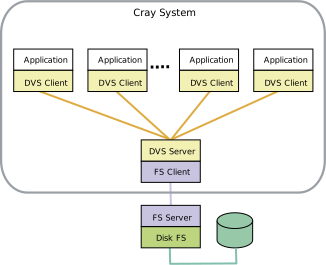
Serial mode is the simplest implementation of DVS, where each file system is projected from a single DVS server (node) to multiple clients (compute nodes). DVS can project multiple file systems in serial mode from the same or different DVS nodes by enteringmaxnodes=1 in the options configuration setting for each client mount set up during configuration or reconfiguration.DVS serial mode adheres to POSIX read/write atomicity rules.
DVS Cluster Parallel Mode
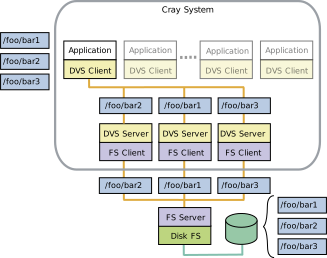
In cluster parallel mode, each client interacts with multiple servers. For example, in the figure below, DVS is mounted to /foo on the DVS client, and three different files—bar1, bar2, and bar3—are handled by three different DVS servers (nodes), thus distributing the load. The server used to perform a file's I/O or metadata operations is selected using an internal hash involving the underlying file or directory inode number. Once a server has been selected for a file, cluster parallel mode looks like serial mode: all of that file's I/O and metadata operations from all clients route to the selected server to prevent file system coherency thrash.DVS cluster parallel mode adheres to POSIX read/write atomicity rules.
DVS Stripe Parallel Mode
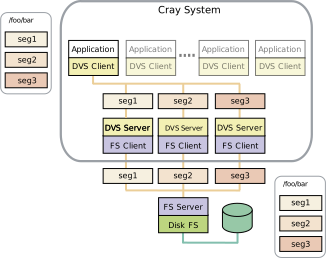
Stripe parallel mode builds upon cluster parallel mode to provide an extra level of parallelized I/O forwarding for clustered file systems. Each DVS server (node) can serve all files, and DVS servers are automatically chosen based on the file inode and offsets of data within the file relative to the DVS block size value (blksize). For example, in the figure below, DVS is mounted to /foo on the DVS client, and the I/O for three different blocks (or segments) of data within file bar—seg1, seg2, and seg3—is handled by three different DVS servers, thus distributing the load at a more granular level than that achieved by cluster parallel mode. All I/O from all clients involving the same file routes each block of file data to the same server to prevent file system coherency thrash. Note that while file I/O is distributed at the block level, file metadata operations are distributed as in cluster parallel mode: the metadata operations of a given file are always handled by the same DVS server. Stripe parallel mode provides the opportunity for greater aggregate I/O bandwidth when forwarding I/O from a coherent cluster file system. GPFS (Spectrum Scale) has been tested extensively using this mode.DVS stripe parallel mode does not adhere to POSIX read/write atomicity rules.
DVS Atomic Stripe Parallel Mode
Stripe parallel mode provides parallelism within a file at the granularity of the DVS block size. However, when applications do not use their own file locking, stripe parallel mode cannot guarantee POSIX read/write atomicity. In contrast, atomic stripe parallel mode adheres to POSIX read/write atomicity rules while still allowing for possible parallelism within a file. It is similar to stripe parallel mode in that the server used to perform the I/O or metadata operation is selected using an internal hash involving the underlying file or directory inode number, and the offset of data into the file is relative to the DVS block size. However, once that server is selected, the entire read or write request is handled by that server only. This ensures that all I/O requests are atomic while allowing DVS clients to access different servers for subsequent I/O requests if they have different starting offsets within the file.
Users can request atomic stripe parallel mode by setting the DVS_ATOMIC user environment variable to on.
DVS Loadbalance Mode
Loadbalance mode is used to more evenly distribute loads across servers. The clients, Cray system compute nodes, automatically select the server based on a DVS-internal node ID (NID) from the list of available server nodes specified in theservers setting within the configurator or configuration worksheet. When loadbalance is enabled, the underlying DVS implementation automatically sets the readonly setting to true and sets these additional options: cache=1, failover=1, maxnodes=1, and hash_on_nid=1. To enable attribute caching as well, set the attrcache_timeout setting for loadbalance client mounts (this is a separate configuration setting within the configurator or configuration worksheet). This allows attribute-only file system operations to use local attribute data instead of sending the request to the DVS server. This is useful in loadbalance mode because with a read-only file system, attributes are not likely to change.
DVS automatically enables the cache mount option in loadbalance mode because using cache on a read-only mount can improve performance. With cache enabled, a DVS client pulls data from the DVS server the first time it is referenced, but then the data is stored in the client's page cache. While the application is running, all future references to that data are local to the client's memory, and DVS will not be involved at all. However, if the node runs low on memory, the Linux kernel may remove these pages, and then the client must fetch the data from the DVS server on the next reference to repopulate the client's page cache.
