Config Set Create/Update Process
Defines how the cfgset command takes configuration content from installed service packages and merges it with site-supplied content to create or update a config set.
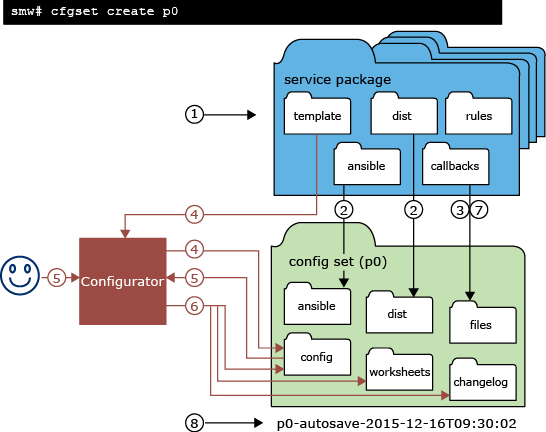
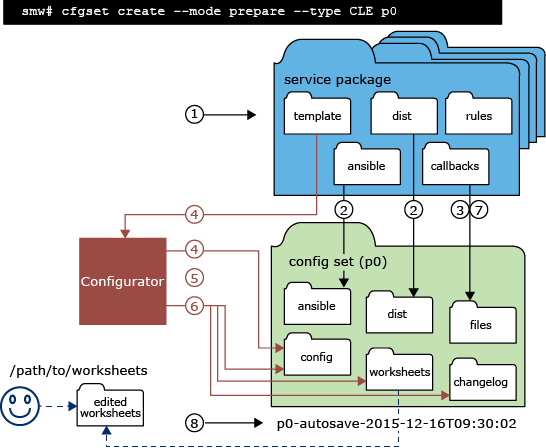
- cfgset searches for service packages in /opt/cray/imps_config.
- cfgset copies to the config set (for create) or overwrites in the config set (for update) ansible and dist content from each service package. Note that it is only content from service packages that is overwritten; content placed in those directories manually is unchanged.Note: Manual changes to service package content in this directory will be overwritten!
- cfgset runs pre-configuration callback scripts from each service package. Scripts act on the config set to create content necessary for system configuration, which they place into the files subdirectory of the config set.
- cfgset invokes the configurator to do steps 4 through 6.
Configurator finds configuration templates from each service package that match the config set type, and then copies them into the config set (for create) or merges them with the templates already in the config set (for update).
- Configurator takes one of these actions to further modify config set template data, depending on the command-line options used:
- interacts with user
- Initiates an interactive session with the user and modifies config set template data based on the values supplied by the user.
Occurs when
--mode interactiveoption used or no mode option used, which defaults toautomode. - does not interact with user
- Does not initiate an interactive session and does no further modification to config set template data beyond the copy/merge of service package data already done in step 4.
Occurs when
--mode prepareoption used. Note that although this action is associated with preparing worksheets, all three actions result in worksheets being written in step 6. - imports worksheets
- Imports configuration worksheets and modifies config set template data based on the values in each service worksheet.
Occurs when
--worksheet-path FILEPATHoption used.
- Configurator writes configuration template data, configuration worksheets, and a changelog to the config set. Note that the configurator never modifies the configuration templates in service packages, which are found in /opt/cray/imps_config/SERVICE PACKAGE for each service package.
- cfgset runs post-configuration callback scripts from each service package.
- cfgset autosaves the config set to a time-stamped clone.
The following three figures illustrate how this eight-step process is used to create a CLE config set. They differ in how configuration data in a config set is further modified in step 5, corresponding to the three different actions: interacting with the user (modification through user interaction), not interacting with the user (no further modification), and importing worksheets (modification through bulk import of configuration worksheets). Black lines indicate cfgset actions, and red lines indicate actions taken by the configurator when invoked by cfgset.